What gets lost between shifts
At 11 PM the evening manager hands over to the night auditor. Room 412 is a late arrival with a prepaid voucher. The guest in 207 complained about noise from the bar. The lock on the pool gate is sticking. The auditor nods, counting the float. At 7 AM the guest in 207 complains again, and the morning team hears about the first complaint for the first time.
A paper front desk log book helps, but only so far. Handwriting is hard to read at 3 AM, nobody can tell who has read which page, and the note from three days ago that still matters is buried under today's. Messaging groups are worse: the handover sits between a birthday photo and a shift swap, and is gone by lunchtime.
A shift logbook works when three things are true. Notes are easy to write, the next shift actually reads them, and anything still open stays in front of people until it is dealt with.
How Turndown's logbook works
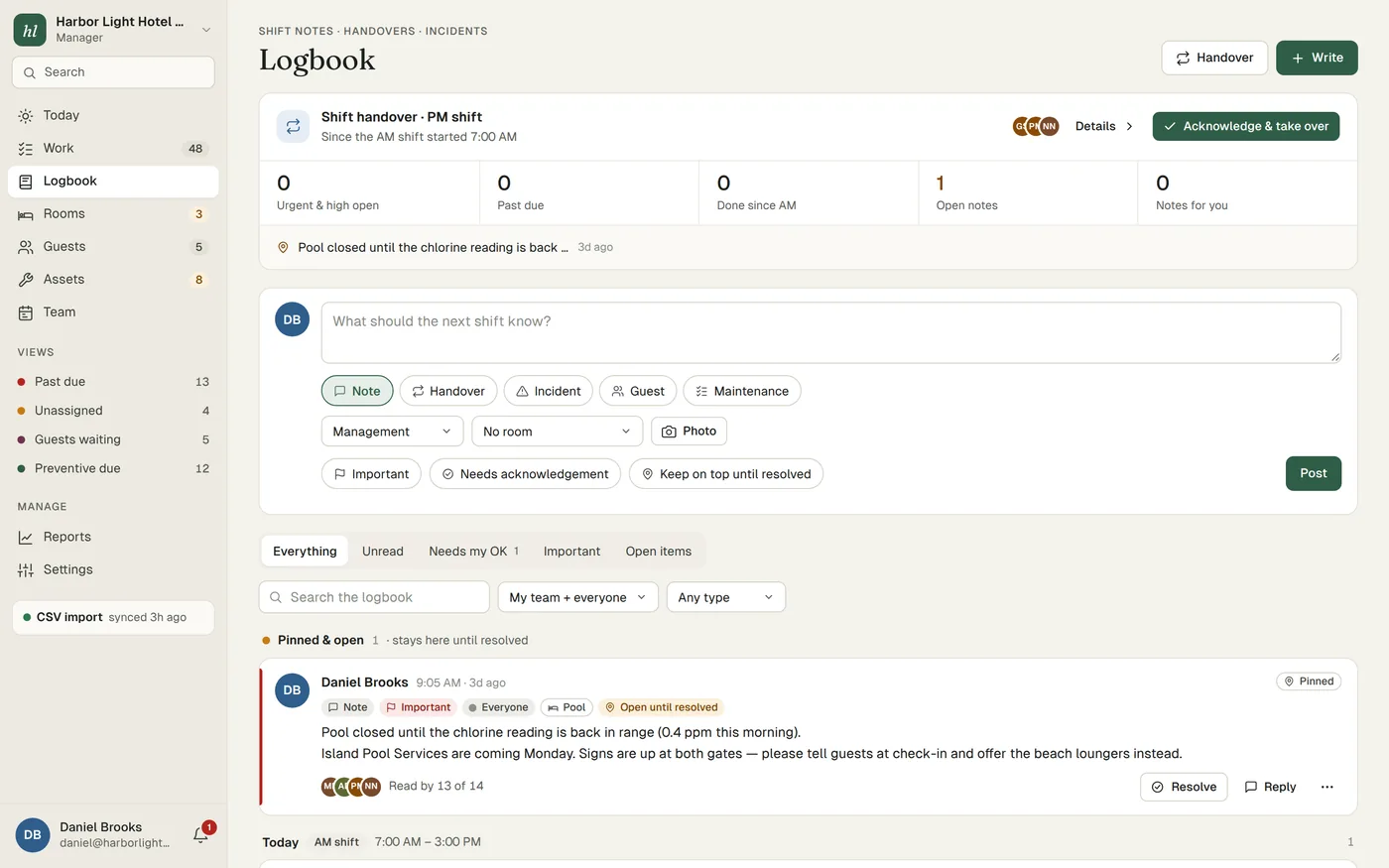
- Shift notes, handovers and incidentsThree kinds of entry in one logbook. A note for anything worth knowing, a handover at the end of a shift, and an incident when something goes wrong and needs a proper record.
- Read receiptsEach note shows who has read it. If the night auditor has not opened the handover by midnight, you can see that and walk over.
- Acknowledge and take overAsk for an acknowledgement on a handover, and the incoming person taps "Acknowledge and take over". That is the moment the open items become theirs.
- Pinned notesPin what everyone needs to see for a while, such as "Pool closed until the chlorine reading is back in range, offer the beach loungers instead".
- Open until resolvedMark a note as open until resolved and it carries over from shift to shift until someone resolves it. The noise complaint in 207 does not disappear at 7 AM.
- On every phoneThe logbook runs in the phone's browser like the rest of Turndown. Each person stays signed in on their own phone for 30 days and reads it in their own language, and notes written without signal are sent when the phone reconnects.
- The whole team in one placeA team directory, and invites that bring new staff in on their first day. Users are unlimited, so nobody shares a login and every note has a real name on it.
What a good shift log entry contains
A log entry is written for someone who was not there. Compare these two.
Hard to act on: "207 noise again, dealt with."
Easy to act on: "10:40 PM. Guest in 207 (Mrs. Patel, out Thursday) called about music from the bar terrace. Asked the bar to turn it down at 10:45, guest called back to say thanks. She asked for a quieter room tomorrow if one is free. Front desk to offer 315 at check-out time if it is clean."
The second one tells the morning team what happened, what was done, what the guest asked for and who does what next. A few rules make entries like that the habit.
- Time and place firstStart with when and where: "2:15 AM, staff car park". It makes the log easy to scan and settles arguments later.
- Facts, not opinionsWrite what was seen and said. "Guest was shouting at the desk" is a fact. "Guest was rude and probably drunk" is an opinion that may be read by the guest's lawyer.
- Say what is still open, and who owns it"Waiting for the locksmith, booked for 9 AM, front desk to let him in" leaves no doubt.
- One subject per entryA note that covers the pool, a VIP and a broken printer is hard to resolve. Three short notes can each be closed on their own.
- Ask for acknowledgement only when it mattersIf every note needs a tap, people tap without reading. Save it for handovers and things that change what the next shift does.
Logbook note or work order
The logbook is for information. Work orders are for jobs. Mixing them is how repairs get lost: "pool gate lock sticking" written in the log is read, nodded at and never fixed.
A simple rule: if someone has to go and do something, it is a job. Report it in Work, where it gets an owner, a priority and a target time. Then, if the next shift needs to know, write a note that points to it: "Pool gate lock sticking, job reported for engineering, gate wedged open with a chair until then". The note explains, and the job gets done. How work orders work in Turndown.
A handover routine that takes ten minutes
- Write the handover before the end of the shift, not at the door. Fifteen minutes before you finish, sit down and write it while you can still remember the details.
- Read it before you take over. The incoming person reads the handover and any pinned or open notes before they log in to the PMS or count the float.
- Talk through what is open. Two minutes face to face on anything unclear. The written note is the record, but questions are faster out loud.
- Acknowledge it. Once you have read it and asked your questions, acknowledge and take over. From that point the open items are yours.
- Resolve what you finish. When the locksmith has been, resolve the note so it stops carrying over. An open list full of finished items gets ignored.
Our hotel shift handover template gives a printable version for the front desk, housekeeping and engineering.
Recording incidents
A guest slips by the pool, a car is scratched in the car park, a staff member cuts a hand in the kitchen. Write an incident entry as soon as the situation is safe, while memories are fresh: the time, the place, who was involved, what happened, what was done and who was told. Stick to what you saw and heard.
The logbook keeps the record, but it does not replace your own procedures. Follow your company's incident process, your insurer's guidance and any local reporting rules, especially where someone was hurt.
Who it's for
Turndown is built for independent hotels, boutique hotels, resorts and villa collections of roughly 20 to 150 rooms, where the night auditor, the duty manager and the chief engineer need to know the same things but rarely work the same hours. The logbook comes with the rest of Turndown, including work orders, rooms and preventive maintenance, in one plan: $299 per property per month, month to month, with unlimited users, setup done for you and a 14-day trial with no card. See pricing.