Where maintenance requests go missing
A guest in 214 tells the front desk the shower runs lukewarm. The front desk radios engineering, but the engineer is on the roof with a pool pump and misses the call. A housekeeper notices a cracked tile in 108 and mentions it at lunch. By evening nobody can say which of these was fixed, and the guest in 214 calls down again.
Nobody here did anything wrong. The request simply never became a work order: a written record with a place, a description, a priority, a person who owns it and a time it should be done by. A hotel work order app makes that step quick enough that people actually do it. Whoever spots the problem reports it from their phone in under a minute, and it stays on the list until someone closes it.
What a good hotel work order contains
Paper or software, a work order is only as useful as what is written on it. These are the details that save an engineer a second trip.
- WhereThe room number, or the place as your staff say it: "pool pump room", "kitchen walk-in", "lobby restroom, men's". If people have to guess, they walk to the wrong place.
- What, in plain words"AC drips onto the desk when it runs on high" beats "AC problem". The engineer can bring a wet vac and check the drain line before leaving the workshop.
- Who reported it, and whether a guest is waitingA dripping tap in a vacant room and the same tap in an occupied suite are different jobs.
- A priority and a time it is due"Urgent" means little on its own. "Due by 3 PM, guest arriving" means something.
- One ownerA named person, not "maintenance". Jobs owned by a department are owned by nobody.
- A photoOne picture of the broken hinge tells the engineer which part to take up four floors.
- How it was closedWhat was done and what was replaced. Without it, the next fault on the same unit starts from zero.
Set priorities your team will believe
If everything is urgent, nothing is. Keep to four levels at most and define them by who is affected, not by who shouts loudest. Here is a starting point. Adjust the target times to the size of your team and your shift pattern.
| Priority | Examples | Example target |
|---|---|---|
| Urgent | Water coming through a ceiling, no power in an occupied room, a safety hazard | Someone on it within 15 minutes |
| High | AC not cooling in an occupied room, a fault in a room due for an arrival today | The same shift |
| Normal | Dripping tap, loose towel rail, a corridor light out | Within two days |
| Low | Paint touch-ups, a sticky drawer in a vacant room | Within two weeks, or grouped into a project |
Then hold the line. When something gets marked urgent that isn't, move it back down. If the urgent list fills with paint touch-ups, your engineers stop trusting it.
How Turndown handles work orders
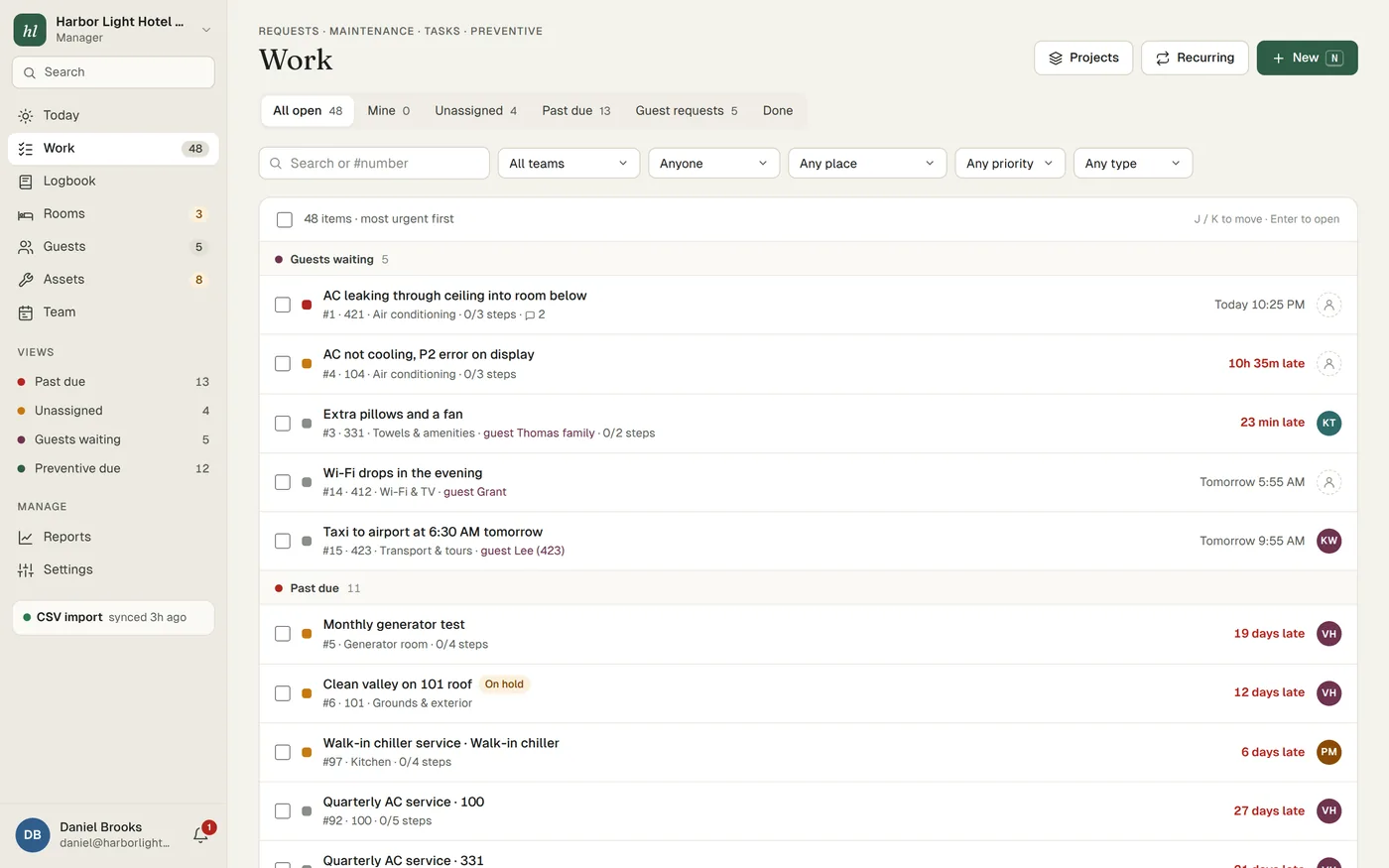
- One queue for all of itGuest requests, maintenance, tasks, preventive work and inspections share one list, sorted by urgency. The front desk, housekeeping and engineering see the same thing, so nobody has to ask on the radio whether 214 was done.
- Target times per priorityYou set a service target for each priority. Every job shows when it is due, and late jobs are easy to spot.
- Assignment by hand or automaticallyGive a job to a person or a team. If you turn on auto-assignment, new work goes to the least-busy person on shift.
- Checklists that block closingAdd steps to a job and mark the ones that matter as required, such as "run the AC for 10 minutes and check it cools". The job cannot be closed until the required steps are ticked.
- Photos, comments and historyAttach photos, comment with @mentions to pull in the right person, and see every change on the job from the moment it was reported.
- Four plain statusesOpen, in progress, on hold and done. On hold is for a part on order or a vendor visit, and it stays on the list so held jobs are still chased.
- Projects and routinesA project is one job across many rooms, such as resealing every shower on the second floor. Routines create recurring work, like the weekly pool pump check or the monthly generator test.
- Rooms held while a repair is openWhen a repair takes a room out of use, the room is held out of order while the job is open and released when it closes, so nobody sells it by mistake. More about the room board.
- Quick from a desk tooBulk edits, saved views, search and keyboard shortcuts for whoever runs the list from the office.
Anyone can report, from any phone
The surest way to lose requests is to make reporting slow. In Turndown, anyone on the team reports from the browser on their own phone. There is no app-store download and no shared login. Each person stays signed in on their own device for 30 days and reads Turndown in the language they choose. A housekeeper with a full cart takes a photo of the broken towel rail, picks the room and sends it, without leaving the floor.
Engineers spend half their day in plant rooms and basements with no signal. Changes made offline are queued on the phone and sent when it reconnects, so a job closed next to the boiler is not lost.
Guests can report too. A QR code in each room opens a simple page where they choose what they need, and the request lands in the same queue as everything else. How guest QR requests work.
Habits that keep a work order list honest
Software helps, but habits do most of the work. These apply whatever system you use.
- One problem, one job. "Room 305: AC noisy, tap drips, curtain rail loose" is three jobs, maybe for three people. Split them so each can be closed on its own.
- Close with a note. "Cleared condensate drain, flushed with water, tested 10 minutes" tells the next person what was tried. "Fixed" tells them nothing.
- Give every hold a reason and a date. "Waiting for fan motor, vendor says Thursday" can be chased. A job on hold with no reason is a job nobody owns.
- Tell housekeeping when you leave a room. A repair leaves dust, footprints and a bed pulled away from the wall. The room needs a check before it is sold again.
- Read the overdue list every week. Go line by line. Give each late job an owner and a next step, or close it if it no longer matters. How to run a weekly backlog review.
- Notice the same unit twice. The third call about the AC in the same room is not three small jobs. It is one unit that needs a repair-or-replace decision.
A person reads your list every Monday
Most hotel work order software leaves the backlog to you. With Turndown, someone from our team reads yours every Monday and sends a short report: each overdue job with a suggested owner and next step, repeat faults flagged, and old jobs that can be closed. Once a month we spend 20 minutes on a call looking at the trend with you.
Reports show first response time, resolution time, on-time rate, re-open rate, created against done, and backlog age, broken down by team, category, place and person. Everything exports to CSV. Which maintenance numbers are worth watching.
Who it's for
Turndown is built for independent hotels, boutique hotels, resorts and villa collections of roughly 20 to 150 rooms, where a small maintenance team covers everything from the pool to the kitchen. It costs $299 per property per month, month to month, with unlimited users. We do the setup: send us your rooms, your equipment and your open issues and we import them. Try it for 14 days with no card and no contract. See what's included.